
What Does Dry Socket Look Like? A Complete Visual Guide to Recognizing and Treating This Painful Complication

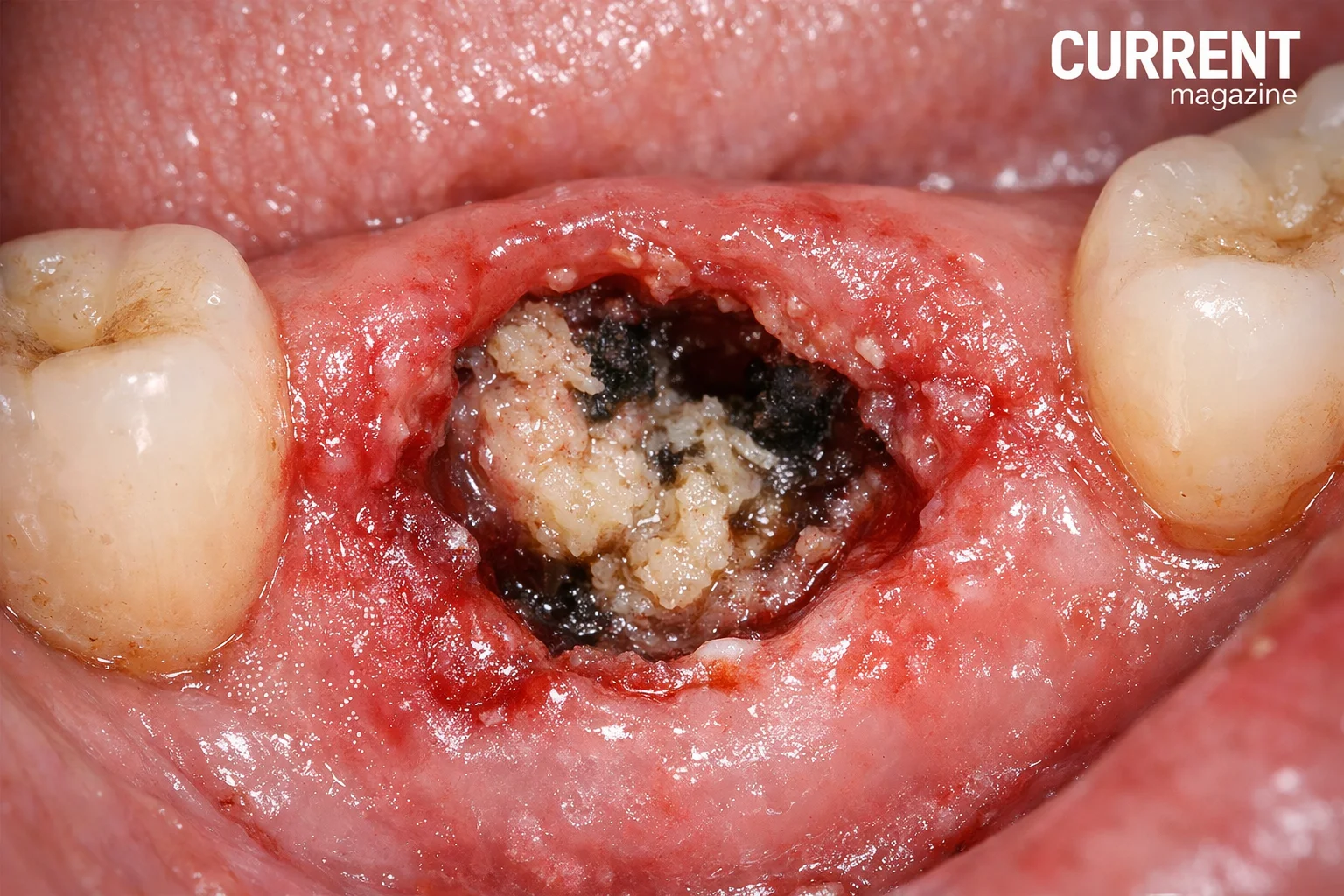
If you’ve recently had a tooth extracted and are wondering “what does dry socket look like?”, you’re asking an important question that could help you identify a painful but treatable complication. Dry socket, medically known as alveolar osteitis, is one of the most common complications following tooth extraction, particularly wisdom tooth removal. Understanding what dry socket looks like, how to recognize it, and what to do about it can save you from unnecessary pain and help you get proper treatment quickly. In this comprehensive guide, we’ll explore everything you need to know about dry socket, including detailed descriptions of its appearance, symptoms, causes, prevention strategies, and treatment options.
What Is Dry Socket?
Before we discuss what dry socket looks like, it’s important to understand what it actually is and why it happens.
The Normal Healing Process:
When a tooth is extracted, your body immediately begins the healing process:
- A blood clot forms in the empty tooth socket (the hole where the tooth was)
- This blood clot acts as a protective layer over the underlying bone and nerves
- The clot serves as a foundation for new bone and soft tissue to grow
- Over time, the socket fills in with new tissue and eventually heals completely
What Happens with Dry Socket:
Dry socket occurs when this protective blood clot:
- Fails to form properly in the first place
- Dissolves or breaks down too early
- Becomes dislodged from the socket before healing is complete
When the blood clot is lost or doesn’t form, the bone and nerves in the socket become exposed to air, food, fluids, and bacteria. This exposure causes severe pain and delays the healing process significantly.
How Common Is It?
Dry socket occurs in approximately:
- 2-5% of all tooth extractions
- 20-30% of wisdom tooth extractions (much higher risk)
- More frequently in lower teeth than upper teeth
- More often in difficult or surgical extractions
What Does Dry Socket Look Like? Visual Description
Now let’s answer the main question: what does dry socket look like?
Visual Appearance
In a Normal Healing Socket:
- You’ll see a dark red or burgundy blood clot filling the socket
- The clot appears moist and somewhat gel-like
- The surrounding gum tissue may be slightly swollen but pink or red
- The socket is protected and covered by the clot
In a Dry Socket:
- Empty Socket: The most obvious sign is that the socket looks empty. Instead of seeing a dark blood clot, you can see down into the hole where your tooth was.
- Visible Bone: You may see whitish or grayish bone at the bottom of the socket. This bone should be covered by the blood clot but is now exposed. The bone may appear dry or have a shiny appearance.
- Partial Clot: Sometimes you’ll see remnants of the blood clot, but it’s clearly incomplete or breaking down. The clot may look patchy, thin, or disintegrating.
- Food Debris: The empty socket may contain food particles or debris that have become trapped because there’s no protective clot to keep them out.
- Surrounding Tissue: The gum tissue around the socket may appear inflamed, red, or swollen. In some cases, it may look slightly whitish or grayish.
- Discoloration: The area may have a grayish or yellowish appearance, especially if infection is developing.
Key Visual Indicators:
- Empty appearance – The socket looks hollow or empty rather than filled
- White or gray color – You can see exposed bone which appears lighter than surrounding tissue
- Lack of the dark clot – The protective dark red clot that should be there is missing or incomplete
- Visible depth – You can see deeper into the socket than you should be able to
Using a Mirror to Check
If you suspect dry socket, you can carefully examine the extraction site:
How to Look:
- Use a flashlight and mirror in a well-lit area
- Gently open your mouth wide (don’t stretch too much)
- Look for the extraction site
- Compare it to the descriptions above
Warning: Don’t touch, probe, or rinse vigorously, as this could make things worse.
Symptoms of Dry Socket Beyond Appearance
While knowing what dry socket looks like is important, the symptoms are often just as telling:
Pain – The Most Prominent Symptom
Timing:
- Typically begins 2-4 days after tooth extraction
- Some people notice it within 24 hours
- Pain that starts immediately after extraction is usually normal post-operative pain, not dry socket
Characteristics of Dry Socket Pain:
- Severe and throbbing – Much worse than normal post-extraction discomfort
- Radiating pain – Spreads from the socket to your ear, eye, temple, or neck on the same side
- Increasing intensity – Gets worse instead of better over days
- Not relieved by standard painkillers – Over-the-counter pain medication provides little to no relief
- Constant – The pain is persistent rather than occasional
- Worsens with eating or drinking – Anything touching the area intensifies the pain
Pain Comparison:
- Normal extraction pain: Gradually improves day by day, manageable with prescribed painkillers
- Dry socket pain: Intense, worsening, radiating pain that standard painkillers can’t control
Bad Breath and Unpleasant Taste
Halitosis:
- Noticeably bad breath that’s worse than typical morning breath
- A foul odor coming from the extraction site
- Others may notice the smell
Bad Taste:
- A persistent unpleasant, sometimes metallic or foul taste in your mouth
- The taste doesn’t go away with brushing or mouthwash
- May taste like infection or decay
Why This Happens:
- Exposed bone and tissue can develop bacterial growth
- Food particles trapped in the empty socket decompose
- Lack of blood clot allows bacteria to proliferate
Other Symptoms
Swollen Lymph Nodes:
- Tender or swollen glands in your neck
- Usually on the same side as the extraction
Difficulty Opening Mouth:
- Limited jaw movement
- Stiffness or discomfort when opening wide
Ear Pain:
- Pain that radiates to the ear
- May feel like an earache but originates from the socket
General Feeling of Being Unwell:
- Fatigue or malaise
- Occasionally low-grade fever (though high fever suggests infection)
Timeline: When Does Dry Socket Develop?
Understanding the typical timeline helps you know when to be vigilant:
Day of Extraction (Day 0):
- Pain and discomfort are normal
- Blood clot should form within hours
- Gauze is used to control bleeding
Days 1-2:
- Some pain, swelling, and minor bleeding are normal
- You should be following post-extraction care instructions carefully
- Pain should be manageable with prescribed medication
Days 2-4 (Most Common Time for Dry Socket):
- This is when dry socket most frequently develops
- If pain suddenly increases rather than decreases, be concerned
- New onset of severe pain during this period is a red flag
Days 5-7:
- Dry socket can still develop but becomes less common
- Normal healing should be progressing well by this point
After Day 7:
- Dry socket is rare after the first week
- If you develop problems this late, it may be something other than dry socket
Important Note: If you had minimal pain that was improving, then suddenly experience severe pain 2-4 days after extraction, dry socket should be strongly suspected.
What Causes Dry Socket?
Understanding the causes helps with prevention. Here are the main risk factors:
1. Smoking and Tobacco Use
Why It’s the Biggest Risk Factor:
- Sucking action when smoking can dislodge the blood clot
- Chemicals in tobacco impair healing
- Nicotine reduces blood supply to the healing area
- Heat and smoke irritate the socket
- Significantly increases risk by 2-3 times
Risk applies to:
- Cigarettes
- Cigars
- Vaping/e-cigarettes
- Chewing tobacco
- Any nicotine products
2. Poor Oral Hygiene
How It Contributes:
- Bacteria in the mouth can prevent clot formation
- Existing infections can interfere with healing
- Not following post-extraction care instructions
- Allowing food debris to accumulate in the socket
3. Drinking Through a Straw
The Suction Problem:
- The sucking motion creates negative pressure in your mouth
- This pressure can dislodge the forming blood clot
- Even gentle sucking can be enough to cause problems
- Should be avoided for at least a week after extraction
4. Vigorous Rinsing or Spitting
Why It’s Problematic:
- Forceful rinsing can wash away the blood clot
- Aggressive spitting creates pressure that can dislodge the clot
- Especially risky in the first 24-48 hours
- Even well-intentioned cleaning can cause harm
5. Certain Medications
Birth Control Pills:
- Estrogen may interfere with healing
- Higher doses carry more risk
- Some dentists adjust extraction timing to coincide with lower estrogen phases of the cycle
Other Medications:
- Blood thinners (aspirin, warfarin, etc.)
- Some corticosteroids
- Bisphosphonates (bone medications)
6. Previous History of Dry Socket
Recurrence Risk:
- If you’ve had dry socket before, you’re more likely to get it again
- Inform your dentist of previous dry socket experiences
- Extra precautions may be warranted
7. Difficult or Traumatic Extractions
Why They Increase Risk:
- More tissue trauma during extraction
- Broken bone or tooth fragments
- Longer procedure time
- Greater inflammation
- Wisdom teeth extractions (especially impacted ones)
8. Age and Gender
Statistics Show:
- More common in people over 30
- Slightly more common in women
- May be related to hormonal factors in women
9. Location of Extraction
Risk Varies by Tooth:
- Lower teeth (especially molars) are higher risk
- Wisdom teeth are highest risk
- Upper teeth less commonly affected
- Back teeth more than front teeth
10. Existing Infections
Prior Infection:
- Periodontal disease
- Tooth abscess before extraction
- Pericoronitis (infection around wisdom teeth)
- These all increase dry socket risk
How to Prevent Dry Socket
The good news is that dry socket is largely preventable with proper care:
Before the Extraction
1. Inform Your Dentist:
- Tell them about any medications you’re taking
- Mention previous dry socket experiences
- Disclose your smoking habits honestly
- Ask about timing if you’re on birth control pills
2. Optimize Oral Health:
- Maintain good oral hygiene before the procedure
- Get any existing infections treated
- Consider a professional cleaning beforehand
3. Stop Smoking:
- Quit at least 24 hours before extraction (longer is better)
- Plan to avoid smoking for at least a week after
After the Extraction (First 24 Hours – Most Critical)
1. Protect the Blood Clot:
- Bite gently on gauze as directed (usually 30-45 minutes)
- Don’t disturb the extraction site
- No touching with your tongue, fingers, or objects
- Avoid the area when brushing other teeth
2. No Suction or Pressure:
- Don’t use straws for at least a week
- Don’t smoke or vape
- Don’t spit forcefully
- Drink directly from a cup, letting liquid flow gently into your mouth
3. Gentle Rinsing Only:
- Don’t rinse at all for the first 24 hours
- After 24 hours, rinse very gently with warm salt water
- Don’t swish vigorously
- Let the water fall out of your mouth rather than spitting
4. Careful Eating:
- Stick to soft, cool foods
- Avoid hot foods and beverages
- Chew on the opposite side of your mouth
- Avoid hard, crunchy, or sticky foods
- Don’t drink alcohol (interferes with healing)
5. Rest:
- Take it easy for at least 24-48 hours
- Keep your head elevated when lying down
- Avoid strenuous exercise for a few days
Days 2-7 After Extraction
6. Continue Gentle Oral Hygiene:
- Brush your teeth carefully, avoiding the extraction site
- Continue gentle salt water rinses (after meals and before bed)
- Don’t use mouthwash with alcohol (can irritate)
7. Stay Vigilant:
- Monitor for signs of dry socket
- Don’t assume you’re “in the clear” too early
- Continue avoiding smoking, straws, and forceful spitting
8. Follow All Instructions:
- Take prescribed antibiotics as directed
- Use pain medication as recommended
- Attend follow-up appointments
- Call if anything seems wrong
9. Stay Hydrated and Nourished:
- Drink plenty of water (no straw!)
- Eat nutritious soft foods to support healing
- Avoid dehydration which can impair healing
10. Avoid Risk Factors:
- Continue avoiding tobacco
- Stay away from alcohol
- Don’t consume extremely hot beverages
- Avoid carbonated drinks which can cause pressure
What to Do If You Suspect Dry Socket
If you think you might have dry socket based on appearance and symptoms:
1. Don’t Panic
- Dry socket is painful but not dangerous
- It’s treatable and won’t cause long-term problems
- You will get relief once treated
2. Contact Your Dentist Immediately
Call as soon as possible:
- Don’t wait to see if it gets better on its own
- Describe your symptoms in detail
- Mention when the extraction was performed
- Ask for the earliest available appointment
What to report:
- When pain started and how it’s progressed
- Description of what the socket looks like
- Whether painkillers are helping
- Any other symptoms (fever, swelling, bad taste)
3. Manage Pain Until Your Appointment
What you can do:
- Continue taking prescribed pain medication
- Over-the-counter ibuprofen or acetaminophen may help slightly
- Apply a cold compress to your cheek (not directly in mouth)
- Avoid hot or cold foods that might trigger more pain
- Try to rest and stay calm (stress can worsen pain perception)
What NOT to do:
- Don’t put anything directly in the socket
- Don’t rinse vigorously trying to “clean it out”
- Don’t use oral pain gels or clove oil without dentist approval
- Don’t smoke (will make it much worse)
4. Avoid Making It Worse
Until you see the dentist:
- Eat very soft foods on the opposite side
- Be extremely gentle with oral hygiene
- Avoid anything that could further disturb the socket
- Don’t attempt to “fix” it yourself
Professional Treatment for Dry Socket
Here’s what to expect when you visit your dentist for dry socket treatment:
Examination
The dentist will:
- Look at the extraction site
- Confirm the diagnosis visually
- Ask about your symptoms
- May take an X-ray to rule out other problems (retained bone fragments, etc.)
Treatment Process
1. Cleaning the Socket:
- The dentist will gently irrigate (flush) the socket with saline solution
- This removes any food debris or bacteria
- May be slightly uncomfortable but necessary
2. Medicated Dressing:
- A special medicated paste or gauze is placed directly in the socket
- Common medications include eugenol (clove oil), which has numbing properties
- The dressing protects the exposed bone and promotes healing
- Provides immediate pain relief for most patients
3. Pain Medication:
- Prescription-strength pain relievers may be given
- Often NSAIDs (like ibuprofen) in higher doses
- Sometimes opioid pain relievers for severe cases
- Instructions on how to take medication safely
4. Instructions:
- How often to return for dressing changes (usually every 1-3 days initially)
- Home care instructions
- What to eat and avoid
- Signs of complications to watch for
Follow-Up Care
Dressing Changes:
- You’ll need to return to have the dressing changed regularly
- Each time, the socket is cleaned and re-packed
- Frequency decreases as healing progresses
- Typically needed for several days to a week or more
Healing Timeline:
- Pain relief is often immediate or within hours of treatment
- Complete healing takes the same time as normal extraction (several weeks)
- The dry socket condition itself typically resolves in 7-10 days with treatment
Success Rate:
- Treatment is very effective
- Most patients experience significant pain relief within 24 hours
- Full recovery is expected with proper treatment
Home Remedies and Complementary Care
While professional treatment is necessary, these home remedies can help:
Safe Home Care
1. Salt Water Rinses:
- Mix 1/2 teaspoon salt in 8 ounces warm water
- Gently rinse after meals
- Helps keep area clean without disturbing it
- Don’t swish vigorously
2. Cold Compresses:
- Apply ice pack or cold compress to your cheek
- 15-20 minutes at a time
- Helps with swelling and provides some pain relief
- Don’t apply ice directly to the socket
3. Proper Hydration:
- Drink plenty of water
- Supports overall healing
- Keeps mouth cleaner
- Remember: no straws!
4. Soft Food Diet:
- Yogurt, smoothies (drink from cup), mashed potatoes, soups (cooled)
- Scrambled eggs, oatmeal, ice cream
- Protein shakes, pudding, applesauce
- Avoid anything that requires chewing near the extraction site
5. Clove Oil (With Caution):
- Some people find temporary relief with clove oil
- Only use if recommended by your dentist
- Apply very carefully with a cotton swab
- Too much can be irritating
6. Honey:
- Has natural antibacterial properties
- Some studies suggest it may help healing
- Apply small amount to gauze and place near (not in) socket
- Discuss with dentist first
What NOT to Try at Home
Avoid these common mistakes:
- Poking or probing the socket with your tongue or objects
- Attempting to “pack” the socket yourself with cotton or gauze
- Using hydrogen peroxide or alcohol-based mouthwashes (too harsh)
- Applying heat directly to the area
- Taking aspirin if you haven’t been advised to (can increase bleeding)
- Using tobacco products (severely delays healing)
Complications and When to Seek Emergency Care
While dry socket itself isn’t an emergency, certain symptoms require immediate attention:
Seek Emergency Care If:
High Fever:
- Temperature over 101°F (38.3°C)
- Could indicate serious infection
Severe Swelling:
- Face or neck swelling that’s increasing rapidly
- Difficulty swallowing or breathing
- May indicate spreading infection
Uncontrollable Bleeding:
- Bleeding that won’t stop with pressure
- Large amounts of bright red blood
Numbness:
- Persistent numbness or tingling in lips, tongue, or chin
- Could indicate nerve damage
Severe Symptoms:
- Extreme pain not controlled by any medication
- Confusion or disorientation
- Severe nausea or vomiting
Potential Complications of Untreated Dry Socket
If left untreated:
- Prolonged severe pain
- Delayed healing (weeks to months)
- Increased infection risk
- Possible bone infection (osteomyelitis) – rare but serious
- Chronic pain
The message: Don’t try to tough it out. Dry socket requires professional treatment.
Long-Term Outlook and Recovery
Good News:
- With proper treatment, dry socket heals completely
- No long-term complications in most cases
- The tooth socket will heal normally, just on a delayed timeline
- Pain resolves as healing progresses
Typical Recovery:
- Immediate pain relief from medicated dressing
- Gradual decrease in pain over 7-10 days
- Complete socket healing in several weeks
- Normal function returns fully
Prevention for Future Extractions:
- Inform future dentists about your dry socket history
- Follow post-extraction instructions even more carefully
- Consider extra preventive measures
Dry Socket vs. Normal Healing vs. Infection
It’s important to distinguish between these conditions:
Normal Post-Extraction Healing
Appearance:
- Dark red blood clot visible in socket
- Mild swelling and redness around the area
- Clot may have white or yellowish coating (normal healing tissue)
Symptoms:
- Mild to moderate pain that improves daily
- Some swelling that peaks around day 2-3 then improves
- Manageable with prescribed painkillers
- Slight bleeding first 24 hours
- Minor discomfort when eating
Dry Socket
Appearance:
- Empty socket or partial clot
- Visible whitish/grayish bone
- No protective blood clot
Symptoms:
- Severe pain starting 2-4 days post-extraction
- Pain radiating to ear, eye, or temple
- Bad breath and taste
- Pain worsening instead of improving
- Painkillers don’t help much
Infection
Appearance:
- Pus or thick discharge from socket
- Severe redness and swelling
- May have blood clot or not
Symptoms:
- Increasing pain (like dry socket)
- Fever (more common than with dry socket)
- Swollen lymph nodes
- Warmth and redness spreading beyond extraction site
- General feeling of illness
- Bad taste and smell
Note: Dry socket can potentially lead to infection if untreated, so they can sometimes occur together.
Special Considerations
Wisdom Teeth and Dry Socket
Higher Risk Because:
- Wisdom teeth extractions are often more complex
- Lower wisdom teeth are highest risk of all
- May involve cutting gum tissue or bone
- Longer healing time
- Difficult to keep clean
Prevention is crucial:
- Follow all post-operative instructions meticulously
- Be extra careful with back teeth
- Use prescribed antibacterial rinses as directed
Dry Socket in Smokers
Significantly Elevated Risk:
- Smokers are 2-3 times more likely to develop dry socket
- Chemicals in smoke impair healing
- Physical sucking action dislodges clots
Best Practice:
- Stop smoking at least 24 hours before extraction
- Avoid smoking for at least 72 hours after (ideally a week or more)
- Consider nicotine replacement therapy (patches, not gum or lozenges which require sucking)
- Be honest with your dentist about your tobacco use
Dry Socket During Pregnancy
Considerations:
- Pregnant women can develop dry socket
- Treatment is safe during pregnancy
- Some pain medications may be limited
- Inform dentist of pregnancy before and after extraction
Multiple Extractions
If you have multiple teeth extracted:
- Risk applies to each extraction site
- May develop dry socket in one, some, or all sites
- Follow care instructions for all sites carefully
- May require more intensive treatment if multiple dry sockets develop
10 Frequently Asked Questions About Dry Socket
1. What exactly does dry socket look like compared to normal healing? A normal healing socket has a dark red or burgundy blood clot filling the hole where your tooth was. In contrast, dry socket looks empty with visible whitish or grayish bone at the bottom of the socket. You can see deeper into the socket than you should, and there’s an obvious absence of the protective blood clot. The area may contain food debris and appear hollow or partially filled rather than completely covered with a healthy clot.
2. How soon after tooth extraction does dry socket appear? Dry socket most commonly develops 2-4 days (48-96 hours) after tooth extraction. Some people notice symptoms within 24 hours, but it rarely appears on the same day as the extraction. It’s uncommon for dry socket to develop more than a week after extraction. If you had manageable pain that was improving but suddenly experience severe pain 2-4 days post-extraction, dry socket should be strongly suspected.
3. What does dry socket pain feel like compared to normal extraction pain? Normal extraction pain is moderate, manageable with prescribed medication, and gradually improves each day. Dry socket pain is severe, throbbing, and often described as excruciating. It radiates from the socket to your ear, eye, temple, or neck on the same side of your face. Unlike normal pain, dry socket pain gets worse instead of better, typically starting 2-4 days after extraction. Standard painkillers provide little to no relief, and the pain is constant and intense.
4. Can I see dry socket just by looking in the mirror? Yes, you can often visually identify dry socket by looking in a mirror with good lighting. You’ll see an empty or partially empty socket instead of a dark blood clot. The socket may reveal whitish or grayish bone, and you can see deeper into the hole than normal. However, the severe pain is usually the most obvious indicator. If you suspect dry socket based on appearance and symptoms, contact your dentist immediately rather than relying solely on self-diagnosis.
5. Will dry socket heal on its own without treatment? While dry socket will eventually heal on its own, professional treatment is strongly recommended because: (1) the pain is severe and can be unbearable, (2) treatment provides immediate or rapid pain relief, (3) untreated dry socket significantly delays healing, and (4) there’s an increased risk of infection without treatment. The medicated dressing dentists use provides almost instant relief for most patients and promotes proper healing. Don’t try to tough it out—dry socket is very treatable.
6. What’s the white stuff in my extraction socket – is it dry socket or normal healing? This is often confusing. A white or yellowish coating over a blood clot is usually normal healing tissue (granulation tissue) and is a good sign of proper healing. However, if you see white or grayish bone at the bottom of an empty-looking socket, this indicates dry socket. The key difference is: normal healing shows white tissue forming OVER a clot, while dry socket shows white bone INSTEAD OF a clot. If unsure, severe pain is the distinguishing factor—dry socket hurts intensely, while normal healing causes decreasing pain.
7. How long does dry socket last with and without treatment? With professional treatment, most patients experience significant pain relief within 24 hours. The dry socket condition typically resolves in 7-10 days with treatment, though complete healing of the socket takes several weeks. Without treatment, severe pain can persist for weeks, and complete healing may take months. The socket will eventually heal on its own, but the extended pain and delayed healing make treatment highly worthwhile. Professional treatment dramatically shortens the duration of severe symptoms.
8. Can dry socket happen with stitches in place? Yes, dry socket can still occur even if your extraction site has stitches. While stitches help hold tissue in place and may reduce the risk slightly, they don’t prevent the blood clot from dissolving or being dislodged. The blood clot forms inside the socket, and factors like smoking, using straws, or vigorous rinsing can still disrupt it despite the presence of stitches. Follow all post-operative instructions carefully even if you have stitches.
9. Is dry socket contagious or caused by infection? No, dry socket is not contagious and is not primarily caused by infection, though infection can develop as a complication. Dry socket occurs when the protective blood clot is lost, exposing bone and nerves. The main causes are physical (dislodged clot from smoking, suction, or rinsing), poor blood supply to the area, or trauma during extraction. While bacteria in the mouth can contribute to clot breakdown, dry socket isn’t an infection in the traditional sense, though the exposed socket can become infected if left untreated.
10. What foods should I avoid to prevent dry socket, and what can I safely eat? To prevent dry socket, avoid: hot foods and beverages (first few days), hard or crunchy foods (chips, nuts, raw vegetables), sticky foods (caramel, gummy candy), small seeds or grains that can get lodged in the socket, alcohol, and carbonated beverages. Safe foods include: yogurt, pudding, mashed potatoes, smoothies (drunk from a cup, no straw), scrambled eggs, ice cream, soups (cooled to lukewarm), oatmeal, protein shakes, applesauce, and soft pasta. Chew on the opposite side of your mouth, and stick to soft, cool or room-temperature foods for at least the first week.